Quick Answer: Yes for Most Models (But Not All)
Yes, you can swim with an Apple Watch—but only if you own the right model and follow a few key safety steps. Apple Watch Series 2 and later, the Apple Watch SE, and the Apple Watch Ultra are all water resistant and suitable for swimming in pools and the ocean. However, the original Apple Watch (1st generation) and Series 1 are not designed for swimming and should only be exposed to splashes and handwashing.
The distinction matters because Apple Watch is water resistant, not waterproof. This means it can handle water exposure under normal swimming conditions, but its protection is not permanent and can weaken over time with wear, temperature changes, and exposure to chemicals like chlorine and soap.
If you own a swim-capable model, two simple habits will keep your watch safe: enable Water Lock before you enter the water, and rinse your watch with fresh water as soon as you finish swimming. These steps take seconds but make a real difference in protecting your device’s long-term water resistance.
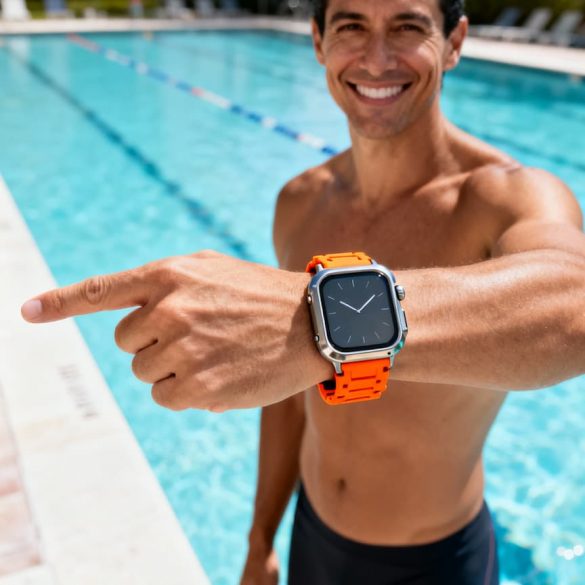
Quick Model Reference: Can You Swim?
- Apple Watch (1st generation) and Series 1: No — splash and handwash only (IPX7 rating).
- Apple Watch Series 2–10: Yes — pool and ocean swimming (WR50 rating under ISO 22810:2010 standard).
- Apple Watch SE (1st and 2nd generation): Yes — pool and ocean swimming (WR50 rating).
- Apple Watch Ultra and Ultra 2: Yes — pool, ocean, and recreational diving to 40 meters (WR100 rating under EN13319 dive standard). Also suitable for high-velocity water sports.
The WR50 and WR100 ratings indicate water resistance at those depths, but the numbers don’t mean you can dive 50 or 100 meters safely; instead, they reflect the watch’s ability to handle the pressure and movement of normal swimming activities.
Now that you know your model is (or isn’t) swim-capable, let’s explore the specific water resistance ratings, how to use Water Lock, and the precautions that will keep your Apple Watch working reliably for years of swimming.
Apple Watch Water Resistance Ratings by Model
Apple Watch models vary in their water resistance capabilities, with clear distinctions on suitability for swimming based on official ratings. Here’s the breakdown by category, grounded in Apple’s standards.
- Apple Watch (1st generation) and Series 1: Rated IPX7 splash resistance (IPX7 means it can handle temporary submersion up to 1 meter for 30 minutes). Splash only—no swimming or submersion. Pool: no. Ocean: no. Diving: no.
- Series 2 through Series 10 and all SE models: Water resistance 50 meters (WR50) under ISO 22810:2010 standard for everyday water resistance (this tests static pressure for shallow-water activities, not dynamic diving). Pool: yes. Ocean: yes. Diving: no.
- Apple Watch Ultra and Ultra 2: Water resistance 100 meters (WR100) and EN13319 dive-related standard (certifies for water sport and recreational dive gear). Supports recreational dive to 40 m. Pool: yes. Ocean: yes. Diving: yes, recreational only with limits.
These ratings indicate tested performance under controlled conditions, so real-world use—like swimming strokes adding pressure—requires care to stay within limits.
Water Resistant vs Waterproof: What It Means
Water resistant means your Apple Watch can handle specific amounts of water pressure under controlled test conditions, like shallow submersion for limited times, but it’s not built for unlimited exposure. Ratings such as WR50 (water resistance 50 meters), often measured in ATM (atmospheres of pressure, where 1 ATM equals about 10 meters of water depth), or IPX7 (splash resistance up to 1 meter submersion for 30 minutes) set these limits clearly for everyday use.
These ratings come from lab tests simulating static water pressure, not real-world movement or long durations—think pool laps at surface level, not deep dives. For instance, a WR50-rated model suits casual swimming where your strokes add some pressure, but pushing to 10 meters depth exceeds its design.
Water Resistance Myths
A common mix-up is “waterproof vs water resistant Apple Watch”—no Apple Watch is waterproof, meaning fully impervious to all water forever. The myth leads folks to treat them like dive gear, but water resistance has boundaries: it’s for planned shallow activities, not surprises like sudden depths or rough conditions. Always stick to your model’s tested limits to stay safe.
Over time, water resistance can degrade from normal wear, drops, or impacts that weaken internal seals. Even a fresh watch loses some protection after years of use, so regular checks matter.
Match your activities to the right rating: standard models like Series 2 and later with WR50/ISO 22810:2010 (standard for everyday water resistance) handle pool or open-water swimming nicely. Deeper pursuits, like recreational dives to 40 meters, fit only the Ultra’s WR100/EN13319 (dive-related standard)—still not for scuba pros or extreme depths. A beginner sticking to laps sees reliable performance, while a snorkeler venturing below 5 meters risks seal stress.
Best Apple Watch for Swimming: Series vs Ultra
Choosing between a standard Apple Watch and the Ultra comes down to your swimming environment and ambitions. Both can track swim workouts, but they differ in water resistance ratings, durability in demanding conditions, and special features.
Quick Decision Guide
If you swim mainly in pools or occasionally in calm open water, any Apple Watch Series 2 or later (including SE) delivers solid performance with its WR50 rating under ISO 22810:2010 standard. These models track laps, stroke types, and distance reliably for recreational swimmers.
If you frequent rough ocean conditions, plan regular open-water adventures, or want the confidence of a higher water resistance margin, the Apple Watch Ultra or Ultra 2 is the better choice. With its WR100 rating (compliant with EN13319 dive-related standards), it handles high-velocity water and offers recreational scuba diving capability down to 40 meters.
Real-World Scenarios
Sarah is a beginner lap swimmer who swims three times a week in her local pool. She owns an Apple Watch Series 8. The WR50 rating is more than enough for her needs; she tracks laps and SWOLF scores without worry. She rinses her watch after each session and has had zero issues after 18 months. For her use case, upgrading to an Ultra would be overkill.
Marcus is a triathlete who trains in both pools and open ocean. His Series 2 has served him well for pool workouts, but he recently added ocean swims to his training plan. He still uses the Series 2 successfully, though he’s more cautious about rinsing thoroughly after salt water exposure. If he later takes up ocean kayaking or wants to snorkel during vacations, he’d consider the Ultra for that extra water resistance cushion and depth capability.
David wants Apple Watch Ultra swimming features for his vacation plans: snorkeling in the Caribbean and beach days with wave action. He chose the Ultra because its WR100 rating and EN13319 compliance give him peace of mind for recreational diving and splashing. He can safely snorkel down to 40 meters (though he’s not a certified diver, so he stays shallower) and doesn’t stress about strong wave impacts or sand exposure.
Key Differences at a Glance
Standard Series and SE models (WR50, ISO 22810:2010) are ideal for swimmers focused on lap tracking, calm-water open-water swims, and everyday water exposure. They excel at what swimmers need most: reliable workout data and splash protection.
The Ultra (WR100, EN13319) adds a higher margin for rugged water use, high-velocity impacts, and recreational diving. It’s best for adventure-minded users or those who spend extensive time in challenging water conditions and want confidence that water resistance won’t be their limiting factor.
Both ranges support Pool Swim and Open Water Swim workout modes, heart rate monitoring (with caveats in cold water), and GPS. The deciding factor is your environment: calm pools and gentle ocean swims favor Series 2+/SE, while adventure and depth drive the Ultra choice.
How to Enable Water Lock on Apple Watch
Here’s how to enable Water Lock on Apple Watch to keep your screen from accidental taps during water activities on swim-capable models like Series 2 and later or Ultra.
Water Lock prevents touches from registering while the watch is wet, so you won’t pause workouts or open apps by mistake. It locks the screen and displays a water drop icon as a visual cue.
1. Enable Water Lock Manually
- From the watch face, press the side button (below the Digital Crown) firmly to open Control Center. You’ll see a grid of icons at the bottom of the screen.
- Tap the water drop icon in the lower row of Control Center. It will expand and fill the screen, confirming Water Lock is active with dripping water animation and sound effects.
Note that Water Lock can also turn on automatically when you start a Pool Swim or Open Water Swim workout in the Workout app.
2. Confirm Water Lock is On
Once enabled, look for the prominent water drop icon on the locked screen. Taps and swipes won’t respond—this is normal and protects against water-triggered inputs. Only the Digital Crown works for deactivation or water ejection.
3. Eject Water After Swimming
- Hold the Digital Crown and rotate it firmly counterclockwise. You’ll hear distinctive tones (like bubbling sounds) as the speaker vibrates to expel trapped water.
- Continue until the tones stop and the water drop icon disappears from the screen. Pat the speaker dry if needed.
This simple process keeps your swim-capable Apple Watch ready for the next session. With Water Lock handled, focus next on full pre-swim precautions.
Precautions Before, During, and After Swimming
Staying safe with your water resistant Apple Watch means building smart habits around preparation, in-water behavior, and cleanup to help protect its seals from everyday wear.
Before You Get In
Start by inspecting your watch for any cracks, dents, or damage on the screen, case, or Digital Crown—these can let water sneak past seals. Pick a secure, water-friendly band like silicone or fluoroelastomer, which dry quickly and won’t trap moisture. Skip leather bands entirely, as they absorb water and degrade fast during swimming.
Here’s your Pre-Swim Prep checklist to make it routine:
- Enable Water Lock from Control Center (tap the water drop icon).
- Choose a silicone or fluoroelastomer band for secure fit.
- Check for cracks, damage, or loose parts on the watch and band.
- Set your pool length in the Pool Swim workout app if tracking laps.
- Ensure the band fits snug but comfortable to minimize movement.
- Remove any lotions or perfumes from skin and watch beforehand.
While Swimming
Steer clear of anything that stresses the seals: soaps, shampoos, or lotions degrade rubber gaskets over time; hot tubs and saunas create heat and steam that expand materials; high-velocity water from jet skiing or water skiing adds extra pressure. Resist the urge to press buttons or the Digital Crown underwater, as this can force water inside.
After Your Swim
Rinse immediately with fresh water to flush out chlorine or salt—whether from a pool or ocean—then use the Digital Crown to eject trapped water and dry everything thoroughly. A quick beginner mistake to preempt: skipping the rinse after a casual family pool dip, which lets residue build up and weaken resistance faster.
Your Post-Swim Care checklist keeps things simple:
- Rinse the watch and band under fresh running water for 15–20 seconds.
- Rotate or hold the Digital Crown to eject water (listen for the draining tone).
- Dry the watch, band, and charger contacts with a lint-free cloth.
- Inspect for muffled sounds, fogging, or residue in openings.
- Let it air dry fully before charging or wearing again.
- Charge only when completely dry to avoid corrosion risks.
These steps align with Apple guidance and reduce risks like seal degradation, but remember water resistance isn’t permanent and warranty may not cover water damage.
Swimming in Pool vs Ocean: Key Differences
Both pool and ocean environments are safe for Apple Watch swimming (Series 2 and later, SE, or Ultra), but each presents unique care considerations. Understanding these differences helps you protect your device and maintain its water resistance over time.
Pool Swimming: Chlorine Exposure
Chlorine is the primary concern when swimming in pools. While occasional pool swimming is fine, chlorine can gradually weaken the water-resistant seals and gaskets inside your Apple Watch. This degradation happens slowly with regular exposure, not after a single swim. Swimming with your Apple Watch in a pool is generally safe as long as you rinse thoroughly afterward.
Pool water is also typically calm and predictable, which means less stress on the seals compared to rough ocean conditions. This makes pools an ideal training environment for lap tracking and stroke metrics.
Ocean Swimming: Salt, Sand, and Conditions
Ocean environments introduce saltwater and sand, both of which pose greater long-term risks than pool chlorine. Salt accelerates corrosion of metal components and can leave gritty residue in crevices around the Digital Crown and speaker. Ocean waves and currents also create dynamic pressure changes that stress the seals more than a calm pool.
If you plan open-water swimming with your Apple Watch, pay extra attention to rinsing and drying. Ocean conditions are harsher, so a more thorough post-swim routine is essential.
Rinsing and Drying: The Essential Sequence
After any swim—pool or ocean—follow this simple rinsing routine to remove chemicals, salt, and sand:
- Exit the water and immediately hold your Apple Watch under a gentle stream of fresh, clean running water for 15–20 seconds.
- Gently rotate or hold the Digital Crown button while rinsing to help flush water from the speaker openings and the crown mechanism.
- Pat the watch dry with a soft, lint-free cloth, paying special attention to the band, strap gaps, and around the Digital Crown.
- Leave the watch exposed to air for a few minutes before putting on a dry band or applying lotions.
- Do not use soap, shampoo, or high-pressure water during this rinse—fresh water only.
Real-World Scenarios
A family pool dip on a weekend afternoon is low-risk: 20 minutes of casual swimming, followed by a quick 15-second rinse under the tap and a dry with a cloth. Your watch will sustain no damage. Repeat this routine weekly, and your water resistance remains stable.
An open-water ocean session for a triathlete, by contrast, demands more care. After 45 minutes in saltwater, use the full rinsing sequence above, then inspect the Digital Crown, speaker grille, and band seams for any sand or salt deposits. If you spot particles, use a soft brush or pipe cleaner (never metal) to gently clear them, then rinse again. This extra step prevents long-term corrosion.
Fit and Tracking in Both Environments
In both pool and ocean, a snug band fit improves heart rate and stroke tracking accuracy. Water on the skin can slightly reduce sensor contact, so ensure your band is secure but not uncomfortably tight before entering the water. This single step makes a measurable difference in workout data quality.
Using Apple Watch Swim Tracking Features
Apple Watch offers built-in swim tracking through dedicated workout modes, making it a handy tool for swimmers on Series 2 and later models, SE, or Ultra. These features let you monitor your sessions while Water Lock keeps the screen safe from accidental touches.
The two main workout modes are Pool Swim and Open Water Swim. Pool Swim automatically detects laps and strokes in a controlled setting, while Open Water Swim uses GPS to track distance and pace in lakes or oceans. Both modes track basics like laps and strokes, with SWOLF (an optional efficiency metric) available in both modes.
Starting a Pool Swim Workout
- Open the Workout app on your Apple Watch.
- Turn the Digital Crown to scroll to Pool Swim.
- Tap Pool Length and set it (like 25 yards for a standard lap pool).
- Tap Start; Water Lock activates automatically to prevent taps, showing a water drop icon.
Starting an Open Water Swim Workout
- Open the Workout app on your Apple Watch.
- Turn the Digital Crown to scroll to Open Water Swim.
- Tap Start; GPS engages for route and distance tracking, with Water Lock turning on automatically.
Water Lock behavior during these workouts locks the touchscreen to avoid false inputs from water, and it stays engaged until you manually end it or eject water afterward. GPS in Open Water Swim helps map your path without relying on lap detection.
Heart rate readings can be less accurate in water due to movement and water interference, so wear your Apple Watch snug but comfortable on the wrist for better reliability.
For example, with an Apple Watch Series 2 during pool laps, you would start a Pool Swim workout, set your 25-meter pool length, and swim your session. Afterward, end the workout to see detected laps, stroke type (like freestyle), total distance, and average pace in the summary—handy for reviewing your steady 30-minute lap set without a separate tracker.
Common Mistakes and How to Avoid Them
Hey swimmer, even with the best intentions, beginners often trip up on a few key habits that can compromise their Apple Watch’s water resistance. Here’s a quick mistakes checklist to spot and fix them fast, keeping your swims worry-free.
- Mistake: Pressing buttons or the Digital Crown underwater, which can force water past the seals. / Do instead: Rely on touch gestures only and avoid all buttons during your swim.
- Mistake: Skipping the rinse after pool or ocean time, letting chlorine or salt linger. / Do instead: Rinse right away with fresh water as part of your post-swim routine.
- Mistake: Wearing the wrong band, like leather that absorbs water and degrades. / Do instead: Stick to silicone or fluoroelastomer bands for secure, quick-drying comfort.
- Mistake: Forgetting to enable or eject Water Lock before and after swimming. / Do instead: Turn it on via Control Center pre-swim and rotate the Digital Crown post-swim to hear the ejection tones.
- Mistake: Wearing the watch too loose, leading to spotty heart rate tracking in water. / Do instead: Snug it up just right for reliable metrics without discomfort.
- Mistake: Assuming water damage falls under warranty. / Do instead: Remember warranty may not cover water damage and follow care steps diligently.
Steer clear of these, and your Apple Watch stays a reliable pool or ocean partner.
Bands and Accessories for Swimming
Choosing the right band keeps your Apple Watch comfortable and secure during swims, complementing its water resistant design.
Here is a quick guide to band materials that work well in water:
- Good for swimming: Silicone bands — flexible, quick-drying, and stay comfortable when wet.
- Good for swimming: Sport bands (silicone/fluoroelastomer) — designed for water activities, secure hold without trapping moisture.
- Good for swimming: Nylon bands — generally water-friendly, lightweight, and dry fast.
- Avoid for swimming: Leather bands — absorb water, take long to dry, and can degrade.
- Avoid for swimming: Metal bands — heavy when wet, prone to corrosion, and uncomfortable for extended swims.
Opt for a snug fit that allows accurate tracking without slipping, and ensure the clasp locks securely to prevent loss in the water.
When Water Resistance Fails: What to Do
Even with careful use, water resistance on your Apple Watch can degrade over time as seals wear down from normal use and exposure. This is normal and not a defect; seals naturally weaken from wear, pressure, temperature changes, and exposure to chemicals.
Keep an eye out for early signs of water intrusion, such as a muffled speaker or condensation inside the display. These indicate potential issues that need attention right away.
If you spot these problems after swimming, stay calm and follow these simple drying steps to help remove moisture—though they won’t restore seals or guarantee a fix:
- Rotate the Digital Crown several times while holding your watch under fresh, running water to eject trapped water from the speaker, listening for the ejection tone.
- Wipe the exterior gently with a lint-free cloth, avoiding any pressure on buttons or openings.
- Place the watch in a cool, dry spot away from direct heat or sunlight, and allow it several hours to air dry completely.
Once dry, test basic functions, but do not attempt further DIY repairs. Instead, seek Apple service or support for a professional check, as water damage may not be covered under warranty.
FAQs
Swimming Safety and Model Suitability
Can I swim with Apple Watch Series 1?
No. The Apple Watch (1st generation) and Series 1 have an IPX7 splash resistance rating, which means they can handle rain and handwashing but are not designed for swimming. Taking a Series 1 into a pool or ocean is not recommended, as water can seep into the device and cause damage.
Can I swim with Apple Watch Series 2–10 or SE?
Yes. All of these models have a water resistance 50 meters (WR50) rating under the ISO 22810:2010 standard, making them suitable for swimming in pools and oceans. Always enable Water Lock before entering the water and rinse with fresh water afterward, especially after saltwater or chlorinated swimming.
Can I swim with Apple Watch Ultra or Ultra 2?
Yes, with more versatility than standard models. The Ultra and Ultra 2 have a water resistance 100 meters (WR100) rating and comply with the EN13319 dive-related standard, making them suitable for high-velocity water activities and recreational diving down to 40 meters. Follow the same Water Lock and rinsing practices as other models.
Water Resistance Explained
Is Apple Watch waterproof or water resistant?
Apple Watch is water resistant, not waterproof. Water resistant means it can handle immersion and water exposure under normal conditions, but it is not completely sealed against water entry. Over time, seals can weaken due to wear and tear, reducing the watch’s resistance. Avoid prolonged exposure to soaps, shampoos, lotions, steam, and high-velocity water to maintain its water resistance.
What does WR50 mean?
WR50 (water resistance 50 meters) is the ISO 22810:2010 rating used by Apple Watch Series 2 and later, plus the SE models. It indicates the watch is suitable for shallow-water activities like swimming in a pool or ocean. The “50 meters” refers to the pressure resistance of the seals under normal movement, not the depth you can safely dive.
What does WR100 mean?
WR100 (water resistance 100 meters) is the enhanced rating exclusive to Apple Watch Ultra and Ultra 2, complying with the EN13319 standard. This higher rating makes the watch suitable for high-speed water sports and recreational scuba diving down to 40 meters. It provides greater protection than WR50 but should still be rinsed and cared for after water exposure.
Water Lock and Features
How do I enable Water Lock on Apple Watch?
Open the Control Center by swiping down from the top of the watch face. Look for the water drop icon and tap it. The screen will lock and you will see a confirmation. When you finish swimming, hold the Digital Crown (the side button) until you feel vibrations and hear tones as the watch ejects water from the speaker. After this, the watch returns to normal operation.
Does Water Lock make my Apple Watch waterproof?
No. Water Lock prevents accidental screen taps and helps eject water from the speaker after your swim, but it does not make the watch waterproof. It is a safeguard for series-appropriate models (Series 2 and later) that are already water resistant. Series 1 and 1st generation models should not be submerged, regardless of Water Lock.
Does my Apple Watch automatically enable Water Lock during a swim workout?
Apple Watch will auto-lock the display when you start a Pool Swim or Open Water Swim workout. However, it is still a good practice to manually enable Water Lock from the Control Center before entering the water as an extra precaution.
Swimming Environments
Can I swim in the ocean or saltwater with my Apple Watch?
Yes, if you have Series 2 or newer, SE, or Ultra. Salt water and salt residue can degrade the water-resistant seals over time. Always rinse your watch thoroughly with fresh water immediately after saltwater exposure and dry it with a soft, lint-free cloth. Pay special attention to the Digital Crown and seams.
What is the difference between pool and open water swimming with Apple Watch?
Pool swimming involves chlorinated water, which can weaken seals gradually with repeated exposure. Open water (ocean) involves salt and sand, which are more abrasive. Both require a thorough fresh-water rinse after each session. Open Water Swim mode on your watch uses GPS to track distance and route, while Pool Swim mode tracks laps based on your movements. Choose the appropriate workout mode based on your activity.
Do I need to rinse my Apple Watch after every pool swim?
Yes. Chlorine can weaken water-resistant seals over time. A simple 15 to 20 second rinse under fresh, warm tap water (without soap) after every pool session, followed by thorough drying with a lint-free cloth, will dramatically extend your watch’s resistance and lifespan.
Can I use a hot tub or sauna with my Apple Watch?
Hot tubs and saunas are not recommended for most models. High temperatures and humidity can cause the water-resistant seals and materials to expand and contract, creating tiny gaps. The only exception is the Apple Watch Ultra, which may tolerate saunas below 55 degrees Celsius (130 degrees Fahrenheit), but this still requires careful monitoring. Avoid these environments for all other models.
Care and Troubleshooting
Does Apple warranty cover water damage?
Generally, no. Apple’s standard warranty does not cover water damage on most models. Following Apple’s guidelines—enabling Water Lock, rinsing with fresh water, avoiding soaps and extreme heat, and maintaining your watch—helps prevent damage and protects your investment. If damage does occur, contact Apple Support to discuss repair options.
Why does my Apple Watch speaker sound muffled after a swim?
Water may be trapped in the speaker. Immediately after exiting the water, hold the Digital Crown until you hear vibration tones; this ejects water using sound vibrations. Allow the speaker to dry completely for a few hours. If the muffled sound persists after drying, the speaker may have sustained damage and you should contact Apple Support for professional evaluation.
Why is my heart rate reading inaccurate in the water?
Water can interfere with the optical heart rate sensor on the back of your watch. For the most accurate readings during swimming, ensure your watch band is snug against your wrist before entering the water. Be aware that heart rate data collected during water-based workouts may be less reliable than readings during land-based activities; focus instead on metrics like lap count and stroke detection.
What bands are safe for swimming?
Silicone and fluoroelastomer bands are the best choice for swimming. They dry quickly and do not absorb water. Nylon bands are also generally water-friendly. Avoid leather, stainless steel, and fabric bands, as water and chemicals can damage these materials permanently. Choose a band that fits snugly to ensure sensor accuracy and prevent water from flowing between the band and your skin.
What should I do if my Apple Watch is not drying properly or shows condensation inside the screen?
First, ensure you have used the Water Lock eject function by holding the Digital Crown to vibrate water out of the speaker. Leave the watch in a warm, dry environment (not in direct heat or sunlight) for several hours or overnight. Avoid using a hair dryer or oven, as extreme heat can damage internal components. If condensation persists or you notice reduced functionality, contact Apple Support to have the device evaluated by a professional.